Why Video Editing is a Gold Mine in 2026

Video content is exploding. YouTube has 2.7 billion monthly users, TikTok has 1.5 billion, and every business needs video content. But here's the thing: most creators and businesses don't have time to edit their own videos.
This creates massive demand for video editors. In 2026, the creator economy is worth $250 billion, and content creators need editors more than ever to keep up with posting schedules.
Market Opportunity
- ✓ 500M+ YouTube channels
- ✓ 8M+ creators need editors
- ✓ Businesses spending $135B on video
- ✓ Remote work = global clients
- ✓ Recurring revenue potential
- ✓ Low competition in niches
Advantages
- ✓ Start with free software
- ✓ Work from anywhere
- ✓ Set your own hours
- ✓ Creative fulfillment
- ✓ Build retainer clients
- ✓ Skills transfer to many fields
Types of Video Editing Work

🎬 YouTube Videos
The biggest market. Long-form content for creators in every niche - gaming, education, vlogs, reviews, tutorials.
📱 Short-Form Content (Reels/TikTok/Shorts)
Quick, punchy edits with trending effects. High volume, fast turnaround. Perfect for beginners.
🎓 Course & Educational Content
Online course videos, tutorials, webinar editing. Often involves screen recordings and talking heads.
🏢 Corporate/Commercial
Business videos, ads, promotional content. Higher rates but more revisions and approvals.
🎮 Gaming Content
Stream highlights, montages, gaming reviews. Large market with dedicated creators.
💒 Wedding & Event Videos
Edit wedding highlights, ceremonies, corporate events. Seasonal but high-paying.
Software & Tools You Need

Free Options (Start Here)
DaVinci Resolve (Free)
Professional-grade editor used in Hollywood. Free version has everything you need. Industry standard for color grading.
CapCut (Free)
Perfect for short-form content. Easy to learn, great effects, and mobile-friendly. Many creators prefer this for Reels/TikTok.
Paid Professional Software
Adobe Premiere Pro - $22.99/month
Industry standard. Excellent integration with After Effects and other Adobe tools. Most requested by clients.
Final Cut Pro - $299 (one-time)
Mac only. Fast, optimized for Apple hardware. Popular with YouTubers and filmmakers.
Adobe After Effects - $22.99/month
Motion graphics and visual effects. Essential for advanced work and higher rates.
Hardware Requirements
Minimum Specs:
- • 16GB RAM
- • Intel i5 / Ryzen 5 or better
- • SSD storage (500GB+)
- • Dedicated GPU (GTX 1060+)
Recommended:
- • 32GB+ RAM
- • Intel i7/i9 or Ryzen 7/9
- • NVMe SSD (1TB+)
- • RTX 3060+ or M1/M2 Mac
Essential Skills to Learn

Technical Skills
- ✓ Cut and trim footage
- ✓ Add transitions and effects
- ✓ Color correction & grading
- ✓ Audio editing & mixing
- ✓ Adding text and graphics
- ✓ Keyframe animations
- ✓ Export settings for platforms
Creative Skills
- ✓ Storytelling and pacing
- ✓ Music selection
- ✓ Understanding platform trends
- ✓ Thumbnail design
- ✓ Hook creation (first 3 seconds)
- ✓ Matching creator's style
- ✓ Trend awareness
Free Learning Resources
- • YouTube: Peter McKinnon, Justin Odisho, Casey Faris
- • Skillshare: Free trial with editing courses
- • DaVinci Resolve: Free official training
- • Film Riot: Professional techniques
Building Your Portfolio
You need a portfolio before you can get paid clients. Here's how to build one from scratch:
Create Spec Work
Download raw footage from Pexels, Pixabay, or get permission to re-edit existing videos. Create 3-5 sample edits in your target niche.
Offer Free Edits to Small Creators
Reach out to YouTubers with 1,000-10,000 subscribers offering a free edit. Get a testimonial and permission to use in portfolio.
Start Your Own Content
Create your own YouTube channel or social media content. This shows you understand the full creator workflow.
Create a Demo Reel
60-90 second highlight reel of your best work. Put your strongest clips first. Host on YouTube and your website.
Finding Your First Clients

Freelance Platforms
- • Upwork: Best for long-term clients, hourly or project-based
- • Fiverr: Great for beginners, package-based pricing
- • Video Husky: Connects editors with YouTubers
- • Belay: Virtual assistant services including editing
- • Rev: Caption and transcription work (entry level)
Direct Outreach (Best Long-Term)
Reach out directly to creators who could benefit from your services:
- 1. Find creators posting inconsistently (they're overwhelmed)
- 2. Watch their content and identify improvement opportunities
- 3. Create a sample edit of their content (spec work)
- 4. Send personalized DM/email with the sample
- 5. Offer a trial project at discounted rate
Community Building
- • Join creator Discord servers and offer help
- • Participate in Reddit communities (r/YouTubers, r/VideoEditing)
- • Engage on Twitter/X with content creators
- • Attend creator meetups and events
- • Build relationships before selling
Pricing Your Services

Pricing Models
Per Video
Best for beginners and short-form. Easy to quote and understand.
Hourly
Good for complex projects. Track time with Toggl or Clockify.
Retainer
Monthly package for ongoing clients. Best for steady income.
2026 Rate Benchmarks
| Experience Level | Per Hour | Per 10min Video |
|---|---|---|
| Beginner (0-6 months) | $15-30 | $50-100 |
| Intermediate (6-18 months) | $30-60 | $100-200 |
| Advanced (18+ months) | $60-100 | $200-400 |
| Expert/Specialized | $100-150+ | $400-1000+ |
Retainer Package Example
Scaling Your Editing Business

1. Specialize in a Niche
Become the go-to editor for a specific type of content. Gaming editors, real estate video specialists, podcast editors - specialists command higher rates.
2. Build Systems & Templates
Create templates, presets, and workflows for common tasks. This increases your output without increasing hours.
3. Hire Junior Editors
Once at capacity, hire editors to handle overflow. Pay them $15-25/hour while charging clients $40-60/hour. Focus on quality control.
4. Add Related Services
- • Thumbnail design ($25-100 each)
- • YouTube channel management
- • Motion graphics
- • Podcast editing
- • Social media repurposing
Video Editing Earnings Calculator
Results vary; these are estimates, not guarantees.
Frequently Asked Questions
Ready to Start Video Editing?
Download DaVinci Resolve for free and start building your portfolio today.
Get DaVinci Resolve Free →Essential Gear for Video Creators
As an Amazon Associate, we earn from qualifying purchases.
- →Blue Yeti USB Microphone Studio-quality audio for podcasts and videos
- →Neewer Ring Light Kit Professional lighting for content creation
- →Smartphone Tripod Stable shots for TikTok and YouTube
- →Wireless Lavalier Microphone Clear audio on the go
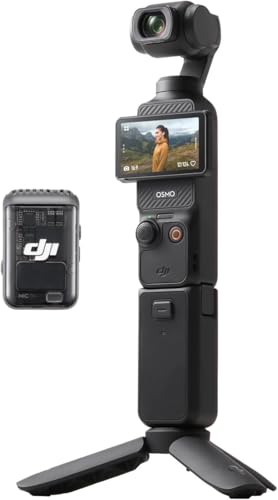
A gimbal-stabilised 1 inch sensor camera built for talking-head and walk-and-talk content, with the wireless mic in the box.
See it on Amazon →